
Thousands of people start a blog every month hoping to earn from Google AdSense, and almost all of them now use ChatGPT, Gemini or Claude to help. Most of them also make the same mistake: they ask AI to “write 50 articles”, publish everything in a week, and then wonder why Google never sends traffic or AdSense rejects the site for “low value content”.
AI is not the problem. The way it is used is. This guide gives you a safe, step-by-step workflow for using AI for blogging — from choosing a niche to publishing a post that can actually rank — plus copy-paste prompts for every step. It is written for complete beginners, especially members of the FluxZap Freelancer Community who are building their first earning website.
First, what Google actually says about AI content
Google does not ban AI-written content. Its rules target low-value content made at scale, no matter whether a human or a machine wrote it. In short:
- Scaled content abuse: publishing many pages mainly to manipulate rankings, with little value for readers, breaks Google’s spam policy. Using AI to churn out pages without adding anything new is a textbook example.
- Fact-checking is now “critical”: in late 2026 Google updated its Search Central guidance to say AI output should be manually reviewed and fact-checked before publishing — including titles, meta descriptions, structured data and image alt text.
- AdSense is separate but similar: AdSense does not allow Google ads on pages with low-value or copied content. Sites full of unedited AI articles are a common reason for “low value content” rejections.
What AI is good at — and where it fails
| Use AI for | Do NOT trust AI for |
|---|---|
| Brainstorming niches and topic ideas | Search volume and keyword difficulty numbers (it guesses) |
| Grouping keywords into topic clusters | Prices, laws, dates, statistics and “latest” information |
| Creating outlines and FAQ sections | Personal experience, testing and original photos |
| Writing a first draft you will edit | Final, publish-ready text with no human review |
| Titles, meta descriptions, alt text ideas | Medical, financial or legal advice (YMYL topics) |
| Improving old posts and finding content gaps | Links and sources (it can invent URLs) |
The 8-step AI blogging workflow
Replace everything in [BRACKETS] before you paste a prompt. Use one chat per article so the AI keeps the context.
Step 1: Pick a niche you can actually help people with
A niche works when it has steady searches, low competition and topics you understand or can test yourself. Let AI give you options, then judge them honestly.
Act as an experienced niche-site consultant. I want to start a blog monetised with Google AdSense.

About me: [your skills, job, hobbies, languages you speak, country]
Target readers: [e.g. India, Pakistan, USA, worldwide]

Suggest 10 blog niches that:
- match my knowledge or things I can test myself
- have evergreen, informational search demand (people asking "how", "what", "best")
- are NOT medical, financial, legal or gambling topics
- are not dominated only by huge brands

For each niche give: who the reader is, 5 example article topics, how hard it is for a beginner (easy/medium/hard), and one risk I should know about.
Step 2: Find low-competition keyword ideas
AI is excellent at thinking like a searcher, but it cannot see real search data. Use it to generate ideas, then check every keyword in a real tool (Google Search Console, Google Keyword Planner, Ubersuggest or Ahrefs’ free keyword generator) and simply Google it to see who ranks.
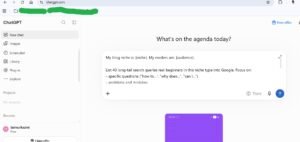
My blog niche is: [niche]. My readers are: [audience].

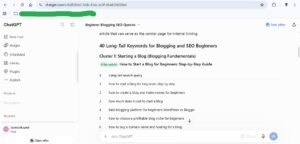
List 40 long-tail search queries real beginners in this niche type into Google. Focus on:
- specific questions ("how to...", "why does...", "can I...")
- problems and mistakes
- comparisons ("X vs Y") and "for beginners" queries

Group them into 5-6 topic clusters. For each cluster suggest which query should be the main "pillar" article.
Do not give search volumes or difficulty numbers — I will check those myself in a keyword tool.
Quick competition check: search the keyword on Google. If the first page shows forums (Reddit, Quora), small blogs or old articles, you have a chance. If it is all big brands and government sites, skip it for now.
Step 3: Study the search intent before writing
Open the top 3-5 results for your keyword and note what they cover and what they miss. Then paste your notes into AI.
My target keyword is: "[keyword]".

Here are notes on what the top-ranking pages cover:
[paste short notes: headings, what each page does well, what is missing or outdated]

1. Explain the search intent in one sentence (what does the searcher really want?).
2. List the questions all top pages answer (the "must cover" topics).
3. List gaps: useful things none of them cover well.
4. Suggest 3 ways my article can be clearly more helpful (examples, steps, a table, a checklist, a tool comparison, a real test).
Step 4: Build a detailed outline
Create a detailed blog post outline for the keyword "[keyword]".

Search intent: [paste from step 3]
Must-cover topics: [paste]
My unique angle / experience: [e.g. "I tested 3 tools", "I work in a warehouse", "I made this mistake myself"]

Rules:
- Answer the main question in the first 100 words
- Use clear H2 and H3 headings written the way people search
- Include one table or checklist where it helps
- Add an FAQ section with 4-5 real questions
- Mark the places where I should add my own screenshot, photo or example with [ADD YOUR EXAMPLE]
Step 5: Write the first draft — section by section
Do not ask for the whole article in one go; long one-shot drafts become repetitive and generic. Write 2-3 sections at a time.
Using the outline above, write the sections "[H2 heading 1]" and "[H2 heading 2]".

Style rules:
- Simple English for beginners, short paragraphs (2-4 lines)
- Practical, specific steps — no filler, no "in today's digital world" intros
- Do not invent statistics, prices, studies or quotes. If a fact needs checking, write [VERIFY] next to it
- Keep the places marked [ADD YOUR EXAMPLE]
- Avoid these overused words: delve, unlock, elevate, game-changer, landscape, seamless, robust
Step 6: Add the human value (the step most people skip)
This is what separates a ranking article from AI spam. Before publishing, add at least three of these:
- Your own screenshots, photos or a short screen recording
- A real example, result or mistake from your experience
- Your honest opinion: what you would choose and why
- Updated facts checked on official websites (prices, limits, dates)
- A table, checklist or template readers can use immediately
Then ask AI to act as a strict editor — not to rewrite everything, but to find problems.
Act as a strict senior editor reviewing this blog post for a beginner audience.

[paste your full draft]

Do NOT rewrite the article. Instead give me:
1. Every claim, number or fact that I must verify, as a list
2. Paragraphs that are generic, repetitive or add no value (quote the first words)
3. Questions a reader would still have after reading
4. Places where a screenshot, example or table would help most
5. A score from 1-10 for helpfulness compared with a typical top-ranking article, with the 3 changes that would raise it most
Step 7: SEO title, meta description and alt text
Google’s guidance now specifically mentions checking AI-written titles, meta descriptions and alt text, so read every suggestion before you use it.
For an article targeting "[keyword]" give me:
- 5 SEO title options under 60 characters (include the keyword naturally, no clickbait)
- 3 meta descriptions under 155 characters that promise exactly what the article delivers
- A short URL slug
- Descriptive alt text for these images: [describe each image in a few words]
Do not exaggerate or promise anything the article does not contain.
Step 8: Internal links and updating old posts
Internal links help Google understand your site and keep readers longer. Every few months, refresh posts that are getting impressions but few clicks in Search Console.
Here is a list of my published articles (title + URL):
[paste list]

My new article is about: "[topic]".
1. Suggest 3-5 existing articles I should link FROM the new article, with natural anchor text.
2. Suggest which older articles should link TO the new one, and the sentence where the link could go.
This older article gets impressions but a low click-through rate in Google Search Console.
Queries it shows for: [paste top queries from Search Console]
Current title and meta description: [paste]
Article content: [paste or summarise]

Suggest: a better title and meta description matching those queries, sections to add or update for 2026, outdated parts to remove, and missing FAQ questions.
Common AI blogging mistakes that kill traffic and AdSense approval
| Mistake | Why it hurts | Do this instead |
|---|---|---|
| Publishing dozens of AI posts in a few days | Looks like scaled, low-effort content | Publish 2-4 well-edited posts a week |
| Copy-pasting AI text without reading it | Wrong facts, repetition, robotic tone | Edit every paragraph and fact-check |
| Rewriting top-ranking articles with AI | No original value; can count as copied content | Add your own tests, examples and opinions |
| Trusting AI keyword volumes | The numbers are made up | Check keywords in a real tool |
| Writing about health, money or law with no expertise | These YMYL topics need real authority | Start with low-risk informational niches |
| Grey-area topics (account selling, hacks, adult) | AdSense policy violations, ranking drops | Stay in clean, advertiser-friendly topics |
| No About, Contact or Privacy Policy pages | Low trust for readers and AdSense reviewers | Create these pages before applying |
A realistic weekly routine for beginners
- Monday: keyword research and intent check for 3 articles (steps 2-3)
- Tuesday-Thursday: outline, draft and edit one article per day (steps 4-6)
- Friday: add images, SEO fields and internal links; publish (steps 7-8)
- Weekend: check Search Console, update one older post, and learn something new about your niche
Expect results in months, not days. New sites usually need consistent, helpful publishing for 3-6 months before Google traffic becomes steady.
Frequently asked questions
Can I get AdSense approval with AI-written content?
Yes, if the content is genuinely helpful, edited and original in value. AdSense rejects low-value content, not AI as such. Unedited, generic AI articles are a common reason for rejection.
Will Google penalise my site for using ChatGPT?
Not for using it. Google judges whether the page helps people. Problems start when AI is used to mass-produce pages that add nothing new, which falls under its scaled content abuse policy.
How many articles should a new blog publish?
Quality beats quantity. Around 20-30 well-researched articles in one focused niche is a far stronger start than 200 thin posts.
Which AI tool is best for blogging?
ChatGPT, Gemini and Claude all work well for outlines and drafts. The tool matters much less than your prompts and the editing you do afterwards.
Do I need to tell readers I used AI?
Google does not require a label for normal articles, but being open about how content is made builds trust. An “About” page explaining your process is a good practice.
Learn and build together
If you want to build an earning website but do not have the budget or experience to start alone, the FluxZap Freelancer Community connects SEO workers with investors and provides training on content, SEO and guest posting. Bookmark this guide, use the prompts on your next article, and remember: AI writes the draft — you make it worth reading.




Good Work Thanks A lot