These 12 Days of Christmas AI prompts will save you hours of December planning. A 12-day countdown is one of the easiest ways to make December feel special at a school, in a shop or at home. The hard part is coming up with 12 fresh ideas, then writing the flyers, emails and posts for each day.
An AI chat tool like ChatGPT, Claude, Gemini or Copilot can do that first draft for you in under a minute, as long as you ask the right way. Below are 40 ready-to-use prompts, grouped by who they are for.
How to use them:
- Copy a prompt and paste it into your AI tool.
- Replace the parts in [square brackets] with your own details.
- Ask follow-up questions like “make it shorter” or “make it funnier” until it fits.
The more detail you give (age group, budget, dates, tone), the better and less generic the answer will be. For quick ways to steer any AI tool, see our list of ChatGPT prompt shortcuts.
Prompts for Teachers and Schools (12)
A “12 Days of Christmas” spirit week, where each school day has a dress-up theme, is a classic December tradition. These prompts help you plan it, announce it and turn it into learning.
Planning the spirit week
- “Create a 12 Days of Christmas dress-up spirit week for an elementary school from [December 1 to 12]. Give each day a fun theme, a one-line description, and make sure every theme is low-cost and inclusive for families of all backgrounds.”
- “Suggest 20 dress-up day themes for a December spirit week that don’t require buying anything new. Group them by ‘easy’, ‘creative’ and ‘silly’.”
- “My school has students from many cultures. Rewrite this list of Christmas spirit days so it feels inclusive for everyone while keeping it festive: [paste list].”
- “Turn these 12 spirit week themes into a calendar table with columns for date, theme, what to wear and a backup idea for students who forget: [paste themes].”
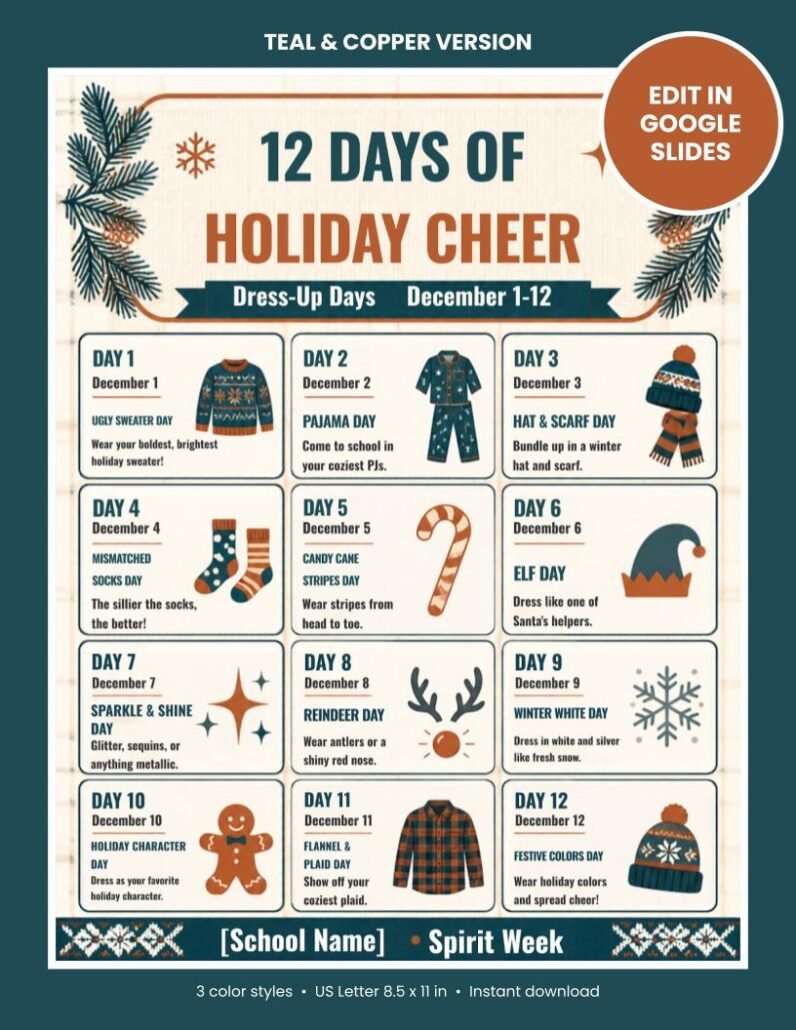
Example result. Here is the kind of plan prompt 1 should give you. Use it as a starting point or as a check that your AI answer is detailed enough:
| Date | Theme | What to wear |
|---|---|---|
| Dec 1 | Ugly Sweater Day | Your boldest holiday sweater |
| Dec 2 | Pajama Day | Cozy PJs (school-appropriate) |
| Dec 3 | Hat & Scarf Day | Any winter hat and scarf |
| Dec 4 | Mismatched Socks Day | Two different socks |
| Dec 5 | Candy Cane Stripes Day | Red and white stripes |
| Dec 6 | Elf Day | Green and red, pointy hat optional |
| Dec 7 | Sparkle & Shine Day | Glitter, sequins or metallic colors |
| Dec 8 | Reindeer Day | Antlers or a red nose |
| Dec 9 | Winter White Day | White and silver |
| Dec 10 | Holiday Character Day | Dress as a favorite holiday character |
| Dec 11 | Flannel & Plaid Day | Any plaid or flannel |
| Dec 12 | Festive Colors Day | Red, green, gold or blue |
Notice that every theme can be done with clothes students already own. If your AI suggests themes that need buying costumes, ask it to “replace anything that costs money”.
Announcing it
- “Write a friendly letter to parents announcing our 12 Days of Holiday Cheer spirit week. Include the dates [dates], explain that participation is optional and free, and keep it under 150 words.”
- “Write 12 short morning-announcement scripts (30 seconds each), one for each spirit day, with a fun fact or joke related to the theme.”
- “Write a school newsletter section about our December spirit week in a cheerful tone. Add a reminder to send photos to [email].”
- “Create 12 short social media captions for our school page, one per spirit day, with 2 relevant hashtags each.”
Classroom activities
- “Create a 12 Days of Christmas math challenge for [grade] students, with one word problem per day that gets slightly harder each day.”
- “Give me 12 five-minute writing prompts for [grade] students, one for each day of a holiday countdown.”
- “Plan a 12 Days of Kindness classroom challenge with one simple act of kindness per day that students can do at school.”
- “Write a short, funny classroom version of the ’12 Days of Christmas’ song about school life, suitable for [grade] students to perform.”
Short on time? If you’d rather skip the design work, we made an editable 12 Days of Christmas dress-up days flyer with 12 ready-made themes. You can change the dates and school name in Google Slides and print it in minutes.
Prompts for Small Businesses and Etsy Sellers (10)
A “12 Days of Deals” countdown gives customers a reason to come back every day in December. Use these prompts to plan the offers and write the content.
- “I run a [type of business] selling [products]. Plan a 12 Days of Christmas sale with a different offer each day. Mix discounts, free gifts and bundles so the margins stay healthy.”
- “Write 12 short promotional emails for a 12 Days of Deals campaign. Each email needs a subject line under 45 characters, a preview line and 80 words of body text.”
- “Write 12 Instagram captions for a holiday countdown at my [shop type], each with a clear call to action and a festive but not cheesy tone.”
- “Give me 15 catchy names for a 12-day holiday sale for a [niche] brand.”
- “Write a short, friendly banner text for my website announcing a 12 Days of Christmas sale from [dates]. Give me 5 versions.”
- “I sell digital printables on Etsy. Suggest 12 Christmas-themed product ideas that teachers and parents search for in December, with a one-line reason each is in demand.”
- “Write an Etsy listing description for [product], with a hook in the first two lines, a ‘what’s included’ list and a short FAQ.”
- “Create a 12-day posting calendar for Pinterest to promote my holiday products, with a pin title and description for each day.”
- “Write a thank-you message for customers who buy during my 12 Days of Christmas sale, including a small discount code for January.”
- “Write 12 short WhatsApp broadcast messages for my customers, one per day of a holiday countdown, each under 40 words.”
Selling printables or other digital products? You can also promote digital products on Reddit or find buyers for digital products on LinkedIn during the holiday rush.
Prompts for Families and Content Creators (10)
A countdown works just as well at home or on a YouTube channel. These prompts help you keep it fun without spending hours planning.
- “Plan a 12 Days of Christmas family countdown with one low-cost activity per day for kids aged [ages]. Include indoor options for cold or rainy days.”
- “Create a 12 Days of Kindness challenge for a family, with one small act of kindness per day that kids can help with.”
- “Suggest 12 small gift ideas under [budget] for a ’12 Days of Christmas’ gift exchange with coworkers.”
- “Write 12 short riddles that lead to hidden gifts around the house, one for each day of a Christmas countdown.”
- “Create a 12-day holiday baking plan with simple recipes kids can help make, plus a shopping list.”
- “Write a funny modern version of the ’12 Days of Christmas’ song about [topic: working from home, a busy mom, a student’s exams].”
- “Plan 12 short YouTube or TikTok video ideas for a holiday countdown series about [my niche], each with a hook for the first 3 seconds.”
- “Write a 60-second video script explaining the history of the ’12 Days of Christmas’ song in simple words.”
- “Suggest 12 blog post ideas for December for a [niche] blog, each with a title that targets a low-competition keyword.”
- “Create a 12-day December journaling challenge with one reflection question per day.”
Running a holiday video series? Check your channel first with this YouTube channel audit checklist.
AI Image Prompts for 12 Days of Christmas Graphics (8)
Use these in image tools like ChatGPT image generation, Gemini, Canva’s AI image tool, Midjourney or Leonardo. Add your own colors and style words at the end. Want to turn family photos into festive portraits instead? Try these Christmas photo prompts for ChatGPT.
- “Flat vector illustration of a cozy ugly Christmas sweater with snowflakes, navy and gold colors, white background, simple clean style for a school flyer.”
- “Set of 12 cute holiday icons in the same style: sweater, pajamas, winter hat, socks, candy cane, elf hat, star, reindeer antlers, snowman, gift, plaid shirt, ornament. Pastel colors, white background.”
- “Festive banner with the words ’12 Days of Holiday Cheer’ in bold playful letters, pine branches and soft snow, warm cream background.”
- “Minimal Christmas countdown calendar background with 12 empty boxes, soft red and green, plenty of space for text.”
- “Watercolor illustration of children in silly Christmas costumes at school, joyful, bright, storybook style.”
- “Rustic holiday background with teal and copper colors, pine branches in the corners, wood texture, empty center for text.”
- “Product mockup of a printed flyer on a wooden desk with a cup of cocoa, fairy lights and pine cones, soft natural light.”
- “Social media square graphic with the text ‘Day 1: Ugly Sweater Day’ in fun bold font, confetti and snowflakes, bright colors.”
Tip: AI images often get text wrong. Generate the picture without words, then add your text in Canva or Google Slides. If an image comes out blurry or small, you can upscale and restore AI images before printing.
5 Tips for Better (Less Generic) AI Results
- Give it a role. Start with “You are an experienced elementary teacher” or “You are a holiday marketing expert”. The answers get more practical. We explain why this works in how to train AI with better prompts.
- Add real limits. Budget, age group, number of students, dates and tone all make the output fit your situation.
- Ask for a table. “Put this in a table with columns for day, theme and notes” gives you something you can paste straight into a sheet or flyer.
- Edit in your own voice. Read the result out loud and change anything that doesn’t sound like you. Parents and customers can tell when text is copied word for word.
- Check facts and dates. AI tools can make mistakes, so double-check holiday dates, school rules and prices before you publish anything.
Weak prompt vs. strong prompt
| Weak prompt | Strong prompt |
|---|---|
| “Give me Christmas spirit week ideas.” | “You are a 3rd-grade teacher. Plan 12 dress-up days for Dec 1 to 12 for 300 students. Everything must be free, inclusive and doable with clothes kids already own. Put it in a table.” |
| “Write a holiday sale email.” | “Write a 90-word email for day 3 of my 12 Days of Deals. I sell handmade candles. Offer: free gift wrap over $30. Warm, simple tone. Subject line under 45 characters.” |
The weak versions give you the same list everyone else gets. The strong versions give you something you can actually use.
Frequently Asked Questions
When are the actual 12 Days of Christmas? Traditionally they run from December 25 to January 5, ending on Twelfth Night before Epiphany on January 6. Schools and shops usually move the idea to the 12 days before the winter break or before Christmas, so everyone can take part.
Which AI tool is best for these prompts? Any modern chat tool works: ChatGPT, Claude, Gemini or Microsoft Copilot. Free versions are fine for planning, letters and captions. For pictures, use a tool with image generation.
Can I use AI-written text in my school newsletter or shop? Yes, but treat it as a first draft. Edit it in your own words, check the facts and follow your school’s or platform’s rules about AI content. Bloggers can follow this safe AI blogging workflow to keep AI-assisted posts original.
How do I make a 12 Days of Christmas spirit week flyer quickly? Use prompt 1 or 4 above to plan the themes, then put them on a flyer. If you want a finished design, our editable 12 Days of Christmas flyer template comes in three color styles and opens in Google Slides.
Where to Start
If you only try one thing, start with prompt 1 (teachers), 13 (businesses) or 23 (families). Each one gives you a full 12-day plan, and every other prompt in its section builds on that plan.
Got a prompt that worked well for your school or shop? Share it in the comments and we may add it to this list.